Sign in Get started

Contact sheet maker

Every photo from a shoot on one printed page, with its number and file name under it.

or drop a folder anywhere here ·

  • Free, no account
  • No watermark
  • Your photos stay on your device
  • A4, Letter or A3
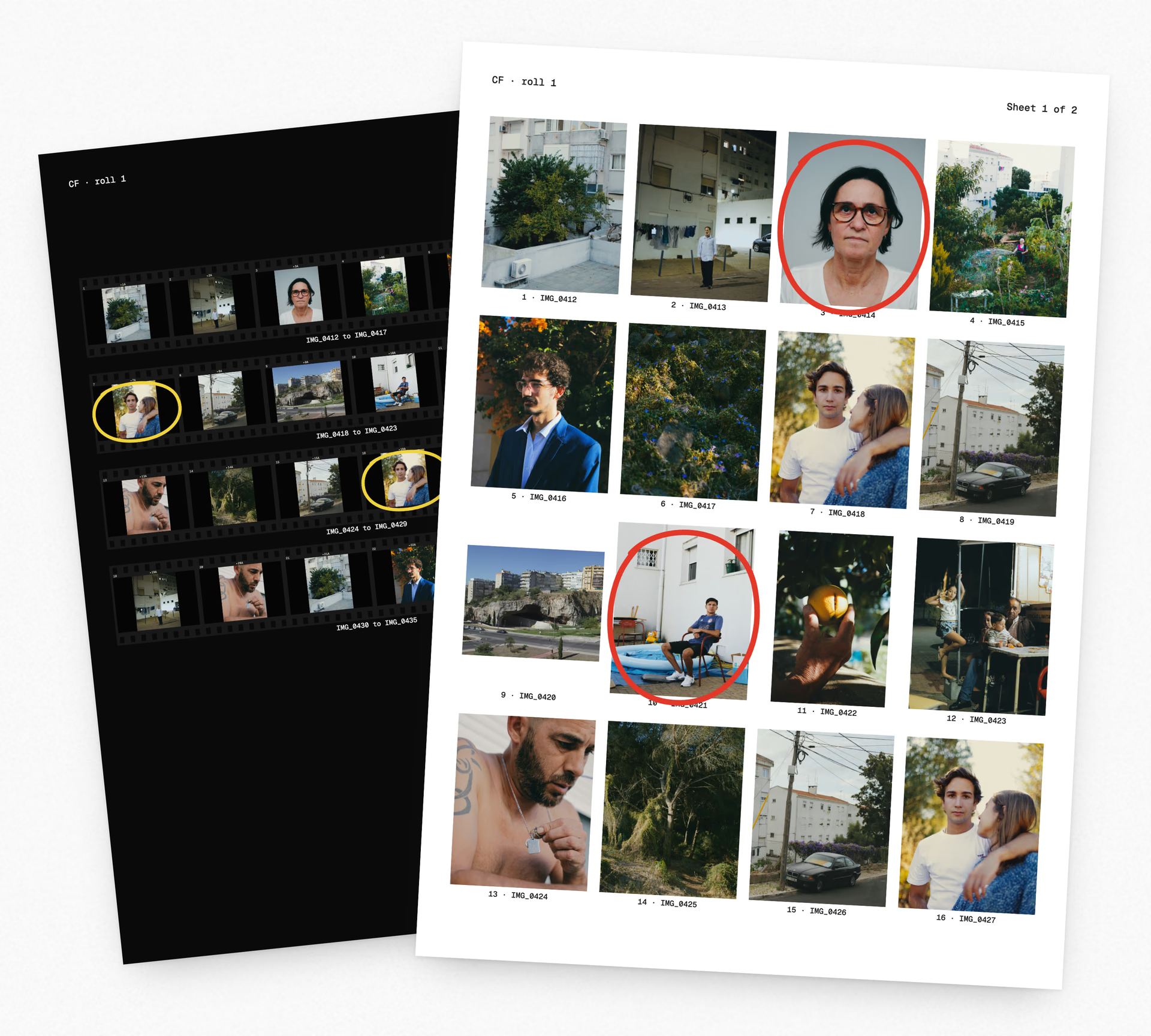
Two printed contact sheets: a white one with sixteen photographs in four columns, a number and file name under each and two frames circled in red, lying over a black sheet of film strips with two frames circled in yellow

A4 · portrait20 frames

Sheets

Taken out

Frames you take out wait here.

Drop your photos here

Sheet 1 of 1

One page with every frame on it.

A contact sheet came out of the darkroom. Negatives were laid on photographic paper under glass and printed at their own size, so a whole roll sat on one page. The keepers got a circle in grease pencil. With digital files the sheet does the same job, and the name under each frame tells you which file to open.

A black contact sheet laid out as strips of 35 mm film, six frames to a strip, with sprocket holes, a number beside every frame and two frames circled in yellow Two strips up close at print size, the frame numbers on their black edge legible between the photographs

Three steps.

A printer and a sheet of paper. On a phone, the PDF goes to Files.

The contact sheet maker opening a batch of photos, the top rows filled, the last row still numbered blanks and the line Opening 12 of 24 under the sheet

1 · Choose your photos

Or drop a whole folder. They go in by file name, or by the time each one was taken.

The maker's settings panel beside a sheet of photographs laid out at six columns

2 · Pick the columns and the paper

Two to eight columns, or film strips with a black edge. A4 or Letter, picked from your time zone.

A frame on the sheet circled in red and shown large in the panel beside it, under the Save PDF button

3 · Circle the keepers and save

Tap a frame to circle it. Save the PDF and print it at 100 percent.

Film strips with frame numbers

Switch the look to film strips and each row prints as a strip of negative, with a black edge and a number beside every frame. On 35 mm the strip has sprocket holes. The frames print at their real size, so thirty fit on one A4 or Letter sheet as six strips of five, and a 120 roll goes four strips of three on A4.

The film strip look on a black sheet, strips of six frames with sprocket holes and frame numbers along the edge

Circle the keepers

Tap a frame and a red ring goes round it, the way a grease pencil marked a darkroom sheet. On a black sheet or on film strips the ring is yellow. The rings print with the sheet.

The top of a white contact sheet, its title and two rows of photographs, three frames circled in red

The number and the file name under every frame

A client or a teacher points at a frame by its number. You open it by its name. Both sit under the frame, and the name is cut short only when the cell runs out of room.

Eight frames at print size, each with its number and file name under it, the first reading 9 · IMG_0420

A blank numbered sheet

Save the PDF before you add any photos and you get the empty grid with a number in each cell, to glue prints into or to plan a shoot. That is 20 cells on A4 at four columns and 16 on Letter.

The blank contact sheet template on A4 lying over the US Letter one, each an empty grid of square cells with a number in each

It works on a phone

Choose photos from your camera roll, circle the ones you want and save the PDF to Files. A3 needs a computer.

The contact sheet maker on a phone, one frame selected and a bar under the sheet with Circle, Move and Take out

Questions

What is a contact sheet?

Every frame from a roll or a shoot, laid out small on one sheet of paper, with a number and the file name under each one so you know which file to open.

Is the contact sheet maker free?

Yes. There is no account and no watermark.

Do my photos get uploaded?

No. The browser reads the files off your device and draws the sheet there. The PDF is saved the same way. Nothing is sent to a server, and your files are never changed.

Do I need to download anything?

No. It runs in the browser on a Mac, a Windows PC, a Chromebook or a phone, and there is nothing to install. It is built and checked in Chrome. A HEIC off a phone opens only where the browser can decode one, so if yours does not, save the photo as a JPEG first.

Can I make a contact sheet without Photoshop?

Yes. Nothing to install and no account. Choose your photos at the top of this page and save the PDF. If you already have Photoshop, Bridge or Lightroom, each can make one from inside the program.

Can I make one from film negatives or lab scans?

From the scans, yes. A lab scan is often a TIFF, and TIFF opens here at 8 or 16 bit, with an Adobe RGB or ProPhoto profile in the file read. Scan the negatives first. This page does not read a negative off a scanner and it does not invert one.

Is there a blank contact sheet template?

Yes. Save the sheet before you add any photos and you get the empty grid as a PDF, with a number in each cell. That is 20 cells on A4 at four columns and 16 on Letter. Pick the columns first and the numbers follow. A ready A4 and a US Letter file are on this page too.

How many photos fit on one sheet?

At four columns, with the margin and gap at their defaults, square cells hold 20 on A4 and 16 on Letter. The cells take the shape most of your photos have, so 3:2 photos fit 28 on A4 and 24 on Letter, and 4:5 photos fit 16 and 12. Square cells on A4 hold 30 at five columns and 42 at six. As film strips the frames print at their real size, so an A4 or Letter sheet holds 30 frames of 35 mm as six strips of five, and A4 holds 12 from a 120 roll. A smaller print size fits more. More photos go onto more sheets in the same PDF.

What size does it print at?

The PDF page is the paper you chose, A4, Letter or A3, so print it at 100 percent and not fit to page. The sheet is drawn at 300 dots per inch.

Can I take a photo off the sheet?

Yes. Take it out and it waits in a tray beside the sheet. Drag it back onto any cell to put it back.

Does it work on a phone?

Yes, on iPhone and Android. Choose the photos from your camera roll and save the PDF to Files. HEIC photos open where the browser reads them. A3 sheets need a computer.

Do the circles print?

Yes. They print in red on a white sheet and in yellow on a black sheet or on film strips. A frame without a circle prints clean.
Every frame,
on one sheet.

Thirty-six frames on one A4 sheet, each with its number and file name. Circle the keepers and print it at home.